
Trigger frameworks in Apex are a good things. We all know we need them, we all know that it is best practice to remove logic from the triggers themselves for several reasons (discussed below), and we all know what a pain it is to unit test code sitting directly in a trigger.
Why should I use a trigger framework?
A trigger handler framework is a way to remove logic from your triggers and enforce consistency across the platform. The framework itself will do the heavy lifting for you in terms of figuring out which kind of trigger is currently running and firing the correct logic.
Here are some of the advantages of using a trigger framework:
- Removing trigger logic from the trigger makes unit testing and maintenance much easier.
- Standardizing triggers means all of your triggers work in a consistent way.
- A single trigger per object gives full control over order of execution.
- Prevention of trigger recursion.
- It makes it easy for large teams of developers to work across an org with lots of triggers. I recently worked on an org which had triggers on around fifty objects, and the fact that every trigger was implemented in a consistent manner made it easy to go in and make changes or add new triggers.
A trigger framework is a great idea if you have more than one developer working in your org. It enables the lead/architect to define how every trigger in the application should work. Using a framework allows the architect to make decisions such as “every trigger must implement a custom setting which allows us to switch the trigger off”. Or perhaps the architect wants to ensure that any validation which occurs in a trigger must be implemented by a method called “Validate()” on the trigger handler for consistency. I’ve worked on orgs where different developers have their own way of implementing triggers, and it makes debugging extremely difficult when one trigger has 1000 lines of code in it, doing 20 different tasks.
Requirements for my trigger framework
Now that I’ve moaned about everyone else’s frameworks, here’s my attempt at something a bit simpler.
- The framework should be easy to understand. Any developer should be able to see how the framework works without having to read through a load of boilerplate code and comments.
- A single handler per object to handle all events in bulkified form (no need for single record implementations).
- An interface for the trigger handlers to enforce consistency.
- No complex trigger factory logic, we’ll use some basic dependency injection instead.
- Need the ability to switch off triggers. This ability must be enforced on every trigger.
- Initial implementation of the framework on a new org needs to be extremely simple.
- Despite the framework being lightweight, it needs to be extensible so that it can be added to as the requirements of the org grow.
- Developers only need to worry about writing their trigger handler class. They shouldn’t need to have to change or even understand the underlying logic of the framework itself (no need to put a new IF statement in a TriggerHanderFactory class, for example).
The interface
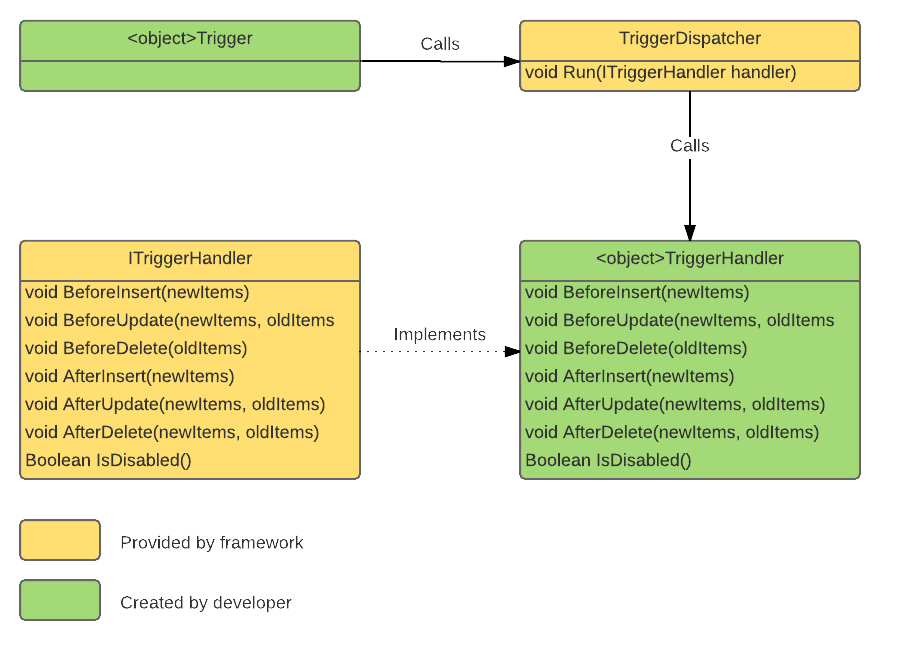
The interface dictates which methods every trigger handler must implement, even if these methods have no code in them. By implementing the methods in this class, the TriggerDispatcher (discussed below) can be confident that the trigger handler has a method for each of these events:
- Before/After Insert
- Before/After Update
- Before/After Delete
- After Undelete
Here’s the code:
public interface TriggerHandler {
    void BeforeInsert(List<SObject> newItems);

    void BeforeUpdate(Map<Id, SObject> newItems, Map<Id, SObject> oldItems);

    void BeforeDelete(Map<Id, SObject> oldItems);

    void AfterInsert(Map<Id, SObject> newItems);

    void AfterUpdate(Map<Id, SObject> newItems, Map<Id, SObject> oldItems);

    void AfterDelete(Map<Id, SObject> oldItems);

    void AfterUndelete(Map<Id, SObject> oldItems);
}
If you’re unfamiliar with interfaces, don’t worry. You don’t need to do anything with this class for now. Just make sure it exists in your org.
The Dispatcher
The dispatcher is responsible for making sure all of the applicable methods on your trigger handler are called, depending on the current trigger context. It also contains a check to make sure that the trigger has not been disabled. If the trigger has been disabled (more on this below), then the trigger events will not be fired (See lines 10/11).
Again, this is part of the framework and you do not need to change this code in any way. Just make sure the class is in your org.
Here’s the code:
public class TriggerDispatcher
{
    /*
        Call this method from your trigger, passing in an instance of a trigger handler which implements TriggerHandler.
        This method will fire the appropriate methods on the handler depending on the trigger context.
    */
    public static void Run(TriggerHandler handler)
    {

        // Detect the current trigger context and fire the relevant methods on the trigger handler:

        // Before trigger logic
        if (Trigger.IsBefore )
        {
            if (Trigger.IsInsert)
                handler.BeforeInsert(trigger.new);

            if (Trigger.IsUpdate)
                handler.BeforeUpdate(trigger.newMap, trigger.oldMap);

            if (Trigger.IsDelete)
                handler.BeforeDelete(trigger.oldMap);
        }

        // After trigger logic
        if (Trigger.IsAfter)
        {
            if (Trigger.IsInsert)
                handler.AfterInsert(Trigger.newMap);

            if (Trigger.IsUpdate)
                handler.AfterUpdate(trigger.newMap, trigger.oldMap);

            if (trigger.IsDelete)
                handler.AfterDelete(trigger.oldMap);

            if (trigger.isUndelete)
                handler.AfterUndelete(trigger.oldMap);
        }
    }
}
Creating a TriggerHandler
Let’s imagine we want to create a trigger for the Account object. For the sake of a very straightforward example, we’ll implement a trigger which rejects any new accounts which have the text “test” in their name.
First, we create a new class called AccountTriggerHandler. We can actually call this class anything we like, but let’s be consistent…
Next, we need to implement the TriggerHandler interface. We need to add “Implements TriggerHandler” to the end of the class declaration, and then we need to add all of the methods from the interface to the class, even if those methods do not contain any logic.
public class AccountTriggerHandler implements ITriggerHandler{

    public void BeforeInsert(List<SObject> newItems) {}

    public void BeforeUpdate(Map<Id, SObject> newItems, Map<Id, SObject> oldItems) {}

    public void BeforeDelete(Map<Id, SObject> oldItems) {}

    public void AfterInsert(Map<Id, SObject> newItems) {}

    public void AfterUpdate(Map<Id, SObject> newItems, Map<Id, SObject> oldItems) {}

    public void AfterDelete(Map<Id, SObject> oldItems) {}

    public void AfterUndelete(Map<Id, SObject> oldItems) {}
}
public class AccountTriggerHandler implements ITriggerHandler{

    public void BeforeInsert(List<SObject> newItems)
    {
        // Reject any Accounts which have the word "Test" in the name
        for (Account acc : (List<Account>)newItems)
        {
            if (acc.Name.contains('test'))
                acc.Name.addError('You may not use the word "test" in the account name');
        }
    }

    public void BeforeUpdate(Map<Id, SObject> newItems, Map<Id, SObject> oldItems) {}

    public void BeforeDelete(Map<Id, SObject> oldItems) {}

    public void AfterInsert(Map<Id, SObject> newItems) {}

    public void AfterUpdate(Map<Id, SObject> newItems, Map<Id, SObject> oldItems) {}

    public void AfterDelete(Map<Id, SObject> oldItems) {}

    public void AfterUndelete(Map<Id, SObject> oldItems) {}
}
Hooking up the trigger
Now we just need to hook the trigger itself in. Create a trigger on your object and make sure it fires on all events.
We only need a single line of code to hook the trigger handler in via the dispatcher. See below.
trigger AccountTrigger on Account (before insert, before update, before delete, after insert, after update, after delete, after undelete) {
    TriggerDispatcher.Run(new AccountTriggerHandler());
}
We simply call the static method on the TriggerDispatcher, and pass it a new instance of our AccountTriggerHandler. The framework takes care of the rest.
This may have seemed like a bit of work, but going forward you would only need to create the triggerhandler and one line trigger for any future triggers.
ERD
Conclusion
This framework may not meet ALL of your org’s requirements, but it’s easy to install (one class and one interface), and will get you up and running with consistent trigger implementations very quickly.
If you’re considering a trigger framework but don’t have the time to implement a more complex solution (or perhaps do not understand the more complex solutions), then you should probably start with a framework like this and build on it yourself. You can always add new functionality as and when it is required.
If, on the other hand, you are NOT considering a trigger handler framework, you should reconsider!
Thanks
 SFDC Info