
First Lightning Component
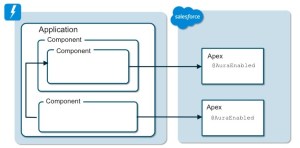
What is Lightning Component?
-
- Lightning components are the self-contained and reusable units of an application.
- For example, Every car is assembled with small-small parts to complete the car manufacturing process. These parts can be replaced as well as reusable.
How to create?
Setup -> Developer console -> New -> Lightning Component
Let’s create our first lightning component. Follow the following steps.
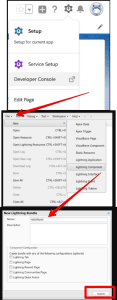
Component 1 : Helloworld1.cmp
<aura:component >
 <h1> This is the First Hello World </h1>
</aura:component>
Component 2 : Helloworld2.cmp
<aura:component >
 <h1> This is the First Hello World 2 </h1>
</aura:component>
We have 2 sample HelloWorld Lightning Components. Now to display a preview of these components we’ll add them in Lightning Application.
How to create?
Setup -> Developer console -> New -> Lightning Application
Lightning Application : HelloWorld .app
<aura:application >
     <c:HelloWorld1 />
     <c:HelloWorld2 />
</aura:application >
- In this way, we can call multiple lightning components inside a lightning application wherein c: is default namespace to call lightning component.
- If you have custom namespace available you can call your lightning components by using that namespace as well.
Now to preview the application we have preview button available on the right-hand side in the lighting application.
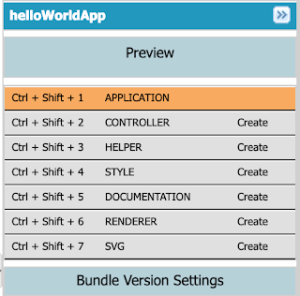
Now you will get the expected output as in new tab:
Output :
This is the First Hello World
This is the First Hello World 2
WOHOOOO…….
We have just created a very first lightning component successfully.
If you like deepaksfdc learning platform please let me know in the Comment section.
Also, Share with your salesforce folks wish you.
Thank You.
 SFDC Info